English-4
SAFETY PRECAUTIONS
The following safety instructions are to ensure your personal safety and prevent
property damage. Please read them to ensure the proper use of the product.
• Do not place the product in a location exposed to direct sunlight, heat, fire, or water.
Exposure may result in a product malfunction or fire.
• Do not apply force to the lenses of the 3D glasses. Do not drop or bend the product.
Applying force, dropping, or bending may result in a product malfunction.
• Use only the specified standard batteries. When replacing the battery, insert the
battery so that its polarity (+, –) is correct. Failing to do so may damage the battery
or result in fire, personal injury or environmental damage caused by liquid leaking
from the battery.
• Keep the used battery out of the reach of children so that they do not accidently
swallow the battery. If your child has swallowed the battery, consult your doctor
immediately.
• When cleaning the product, do not spray water or cleaner directly onto the surface
of the product. Spraying water or cleaner directly onto the glasses may result in fire
or electric shock, damage to the product's surface, or cause the indicator labels on
the product's surface to come loose.
• Do not use chemicals containing alcohol, solvents, or surfactants, or chemicals such
as wax, benzene, thinner, mosquito repellant, lubricant or cleaners. These may cause
a discoloration of or cracks in the product surface and cause the indicator labels on
the product's surface to come loose.
• Since the product surface and lens are easily scratched, make sure to use a
clean soft cloth (the cleaning cloth supplied with the product, a cloth consisting
of superfine fibers or cotton flannel) when cleaning to avoid scratching either the
surface or the lens. As the product may become scratched if there are any foreign
items on the cloth, make sure to shake off any dust before using it.
• Never disassemble, repair, or modify the 3D glasses yourself. Do not use the glasses
when they are out of order or broken.
• Take care that you do not injure your eyes with the edges of the frame of the 3D
glasses when wearing them.
• Use your hands to put on or remove the 3D glasses.
Troubleshooting
If you encounter... Try this...
My 3D glasses do not work.
Replace the battery.
The 3D glasses should be close to the TV. Make sure that the
distance between the TV and your 3D glasses is less than
19.5 feet (6m) in a straight line.
Check the 3D function settings of your TV.
The LED keeps blinking
The battery is dead. Replace the battery.
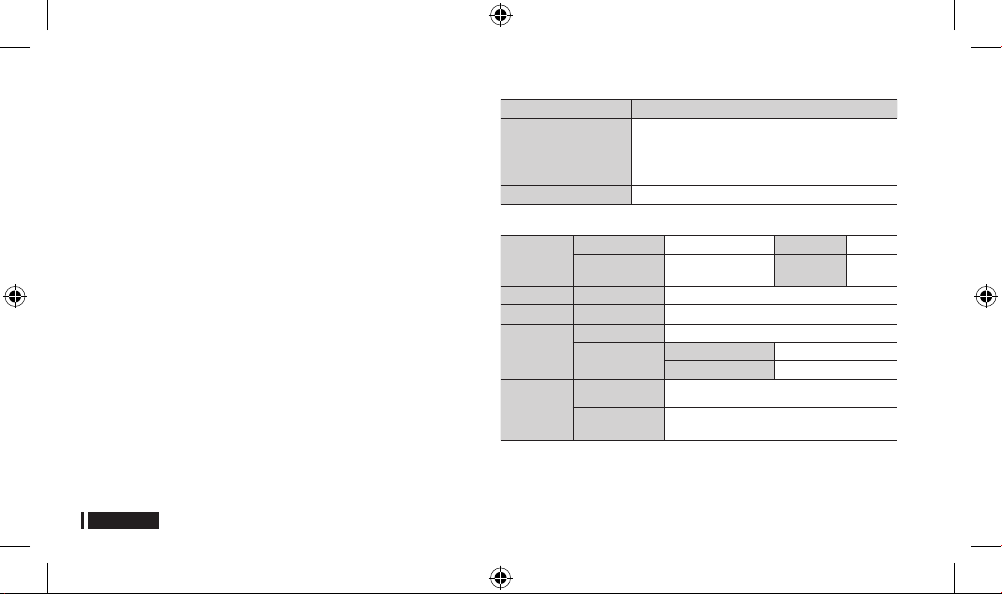
Specifications (Model Number: SSG-5100GB)
Optics
Shutters Liquid crystal Transmittance 36±2%
Recommended
viewing distance
2 ~ 6m (6.5 to 19.5 ft) Field Rate
120 fields/
second
Weight Glasses 21.5g/.76 oz. (including the battery: 24.0±0.5g/.85.±.018oz. )
Power Glasses One 3V lithium/manganese dioxide battery 3V(CR2025)
Power
Consumption
Glasses 0.85mA (Average)
Battery
Type 165mAh, 3.0V (CR2025)
Operating time when On 150 hours
Operating
Conditions
Operating
Temperature
50 °F ~ 104 °F (10°C ~ 40°C)
Custody
Temperature
-4 °F ~ 113 °F (-20°C ~ 45°C)
✎
Product specifications may be changed without notice in order to enhance product
performance.
✎
The continuous operating time may differ depending on the wireless communication
environment and usage conditions.
[NA]SSG-5100GB-00L17.indb 4 2013-01-02 8:44:55


Tham gia cuộc trò chuyện về sản phẩm này
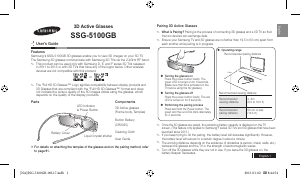
Tại đây bạn có thể chia sẻ suy nghĩ của mình về Samsung SSG-5100GB Kính xem 3D. Nếu bạn có thắc mắc, trước tiên hãy đọc kỹ hướng dẫn. Yêu cầu một hướng dẫn có thể được thực hiện bằng cách sử dụng mẫu liên hệ của chúng tôi.
trả lời | Nội dung này rất hữu ích (0) (Dịch bằng Google)
trả lời | Nội dung này rất hữu ích (0) (Dịch bằng Google)
trả lời | Nội dung này rất hữu ích (0) (Dịch bằng Google)
trả lời | Nội dung này rất hữu ích (0) (Dịch bằng Google)
trả lời | Nội dung này rất hữu ích (0) (Dịch bằng Google)